|
IT Manager and Systems Administration Technical Solutions Journal
 Enter your message here, and click [SUBMIT].
|
| 1/29/2018 6:53:40 PM | | | |
| TLS 1.2 nightmare and the many shots in the dark to fix it |
As the requirement for TLS 1.2 looms, and use of it becomes necessary for PCI compliance, I've made what I thought were the necessary changes, only to find they fell short. Suddenly, our UPS shipping API simply stopped working. No code was changed, their system was up, but their server simply wouldn't give our server (a .net app) anything more than a blank stare. I could get the page to load in Chrome and IE that showed their API was working, but in .net, no response at all. So, on to the registry editing...
First, we went to HKLM\SYSTEM\CurrentControlSet\Control\SecurityProviders\SCHANNEL\Protocols and added TLS 1.1 and TLS 1.2 keys, and in each, Client and Server, and in each of those, DisabledByDefault=0 and Enabled=1 (DWORD-32 values). Reboot, and... nope.
Check IE Internet Options to see that TLS 1.1 and 1.2 are enabled... yep. Try again, and... nope.
Check settings in IIS in Application Pools and the site. Nothing out of place there. More research seems to indicate that while the browser may actively try the highest first, .net may actually be trying the LOWEST first. Since I'm not going to disable everything except TLS 1.2 for comparability reasons, I keep reading...
Add registry settings in HKLM\SOFTWARE\Microsoft\Windows\CurrentVersion\Internet Settings\WinHttp and HKEY_LOCAL_MACHINE\SOFTWARE\Wow6432Node\Microsoft\Windows\CurrentVersion\Internet Settings\WinHttp DefaultSecureProtocols=2048 (hex 0x800) (DWORD-32).
Tried accessing it again, and... YES! The UPS tracking API is now talking to our server once again! I would have thought this last setting would have been set by clicking the checkboxes in IE, but apparently not. The values didn't exist at all, so I added them.
So, there we go... now we're up to date, and our payment and tracking APIs should be working for the foreseeable future. |
| ~I.T. Mgr. | |
|
| 6/12/2015 9:06:19 AM | | | |
| Getting your shares back in an elevated command prompt part 2 |
If you work within the CMD prompt on Win8, 7, and Vista with UAC enabled, you've probably stumbled across the fact that Windows uses separate security tokens for standard and Admin level command prompts. That means drives, printers, and other shares you have attached in Windows or in a normal command prompt don't appear in an Admin level prompt you might have spawned for admin-level work or to run programs that get buggy under a standard prompt. I developed a work-around back in 2013 that involved creating a scheduled task, but this is another solution you may find more convenient.
1) Open REGEDIT
2) Navigate to HKEY_LOCAL_MACHINE\SOFTWARE\MICROSOFT\WINDOWS\CURRENTVERSION\POLICIES\SYSTEM
3) Create a new 32-bit DWORD value, and name it EnableLinkedConnections
4) Edit the new variable and give it a value of 1
5) Close RegEdit and reboot the system.
Upon restart, you should be able to open a standard and admin-level prompt, and see that active shares under a NET USE command are the same in either one! |
| ~I.T. Mgr. | |
|
| 7/9/2014 8:17:09 AM | | | |
| Toshiba laptop charger stops charging? Stick it in the freezer! |
My Acer laptop finally died after many reliable years of service. It picked a fine time to leave me Lucille- right before a Branson vacation!
In a pinch, I purchased a Toshiba laptop from the local big-box store. After a mere month and a half, I turned it on one day, and noticed that it was running on battery power, even though I was sure it was plugged in. After unplugging and re-plugging into different outlets, R&R'ing the battery, and some other tests, I determined that the power supply "thought" it was overheating. It never was very warm to the touch, but it was acting like it was hot- charging for a few seconds, then shutting off.
To test my hypothesis, I put the brick portion of the PSU in a chest freezer, set the laptop on the freezer, and plugged it in after 5 min. It stayed charging for 30 seconds. Progress! I unplugged it from the wall and the laptop, and left it for a full hour, and tried again. This time it stayed charging. Took it back out of the freezer, put it back on the desk, and plugged it back into its normal spot. It's been working for a few days now, and is still working great! That's the first time I've repaired a computer by sticking parts in the freezer! |
| ~I.T. Mgr. | |
|
| 5/28/2014 10:00:46 AM | | | |
| After Windows upgrade to 8, Windows Updates fail to download and install |
 Have you upgraded a Windows XP computer through Vista and 7, to Windows 8? And now that you have, Windows Update fails to run its own updates? And have you tried everything else under the sun and somehow ended up on this page? Have I got a solution for you! Have you upgraded a Windows XP computer through Vista and 7, to Windows 8? And now that you have, Windows Update fails to run its own updates? And have you tried everything else under the sun and somehow ended up on this page? Have I got a solution for you!
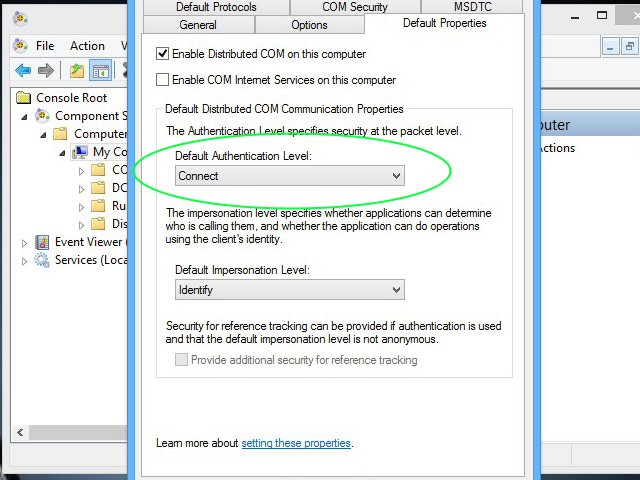
After XP support ended, forcing everyone to move up to Windows 8 (since Win7 is no longer for sale- nice trick, MS!), I needed a solution to help users go through an upgrade path so as not to lose all their programs and settings. The solution was to install, ever-so-briefly, Windows Vista, then Windows 7, each as an upgrade to the previous OS. Then, upgrade to Windows 8, activate, and done! Unfortunately, something gets screwed up in an obscure permission (authentication / impersonation, to be specific) somewhere along the way, and needs to be changed for Windows Update to work.
1) Locate Component Services Manager, or Start -> Run -> dcomcnfg.exe
2) In the tree view, expand Component Services -> Computers
3) Right-click My Computer, and select Properties
4) Select the Default Properties tab
5) Select Connect in the Default Authentication Level list if set to None
6) Select Identify in the Default Impersonation Level
7) Click OK and Yes to confirm, and close the console
Your Windows Updates should now download and install as normal!
|
| ~I.T. Mgr. | |
|
| 9/24/2013 12:42:41 PM | | | |
| CertEnroll:CX509Enrolment:p_InstallResponse: ASN1 bad tag value met. 0x8009310b(ASN: 267) |
If you were searching for the text of the entry title, then you already know why you're here. Here's what happened to me, and how I fixed it.
I needed to set up a secure site for a client, something I've done numerous times. Purcahsed the cert, installed the intermediate, and then installed the site cert. I realized after installation that I needed to change the Friendly Name (and didn't yet know another way to do that, which I'll get into in another post). I deleted the cert, made a new request, and submitted a request to the cert auth for a re-key. Repeated the steps, and got the error: CertEnroll:CX509Enrolment:p_InstallResponse: ASN1 bad tag value met. 0x8009310b(ASN: 267)
After a phone call to the cert auth tech support that went nowhere, I went searching for a solution online. The solution:
· Open a MMC console, and add the Certificates snap-in (FILE -> ADD/REMOVE -> CERTIFICATES -> COMPUTER ACCT -> LOCAL COMPUTER)
· Navigate in the left pane to CERTIFICATES -> CERTIFICATE ENROLLMENT REQUESTS -> CERTIFICATES
· Remove the entries in the center pane.
The apparently identical requests I had present caused the final step of cert installation to look at the wrong request, which wasn't matching the cert. Once the list was cleared, a new request, rekey, and subsequent certificate installation went without a hitch! |
| ~I.T. Mgr. | |
|
| 5/3/2013 10:15:05 AM | | | |
| Thumbnail previews in the taskbar popping up and annoying you in Windows 7 and 8? Here's a fix! |
In theory, the little mini-window previews that instantly pop up when you mouse over an open program on the Windows taskbar are handy for seeing what else you're doing. In reality they just get in the way, because they appear instantly.
Fortunately, there's a registry entry you can add, which will slow down the feature so it's actually useful, and doesn't pop up just because you're "looking with your cursor" as many users do.
In the registry, navigate to HKEY_CURRENT_USER\Software\Microsoft\Windows\CurrentVersion\Explorer\Advanced
Add a new 32-bit DWORD variable, ExtendedUIHoverTime
Change value to decimal, and enter a timed delay, in milliseconds (1000 = 1 second).
Close the Registry Editor, and either reboot, log out and back in, or kill and restart the Explorer.exe process.
Now, when you mouse over a task on the taskbar, the popup will be delayed for however long you specified in the new registry entry. I usually set it to 60000 (1 min.) and haven't tried extremely large values or negative numbers, but a 60 second delay seems to solve the problem for users that are annoyed by this bug- er, feature.
|
| ~I.T. Mgr. | |
|
| 3/26/2013 12:06:18 PM | | | |
| Getting your shares back in an elevated command prompt |
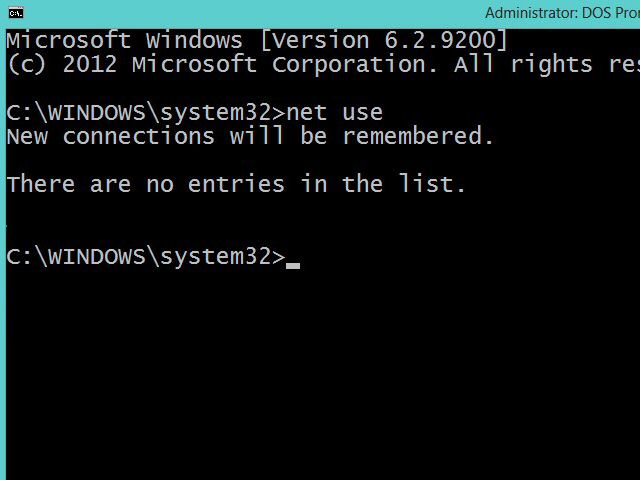 If you do work within the command prompt on Win8 (and Vista and 7 with UAC enabled), you've probably stumbled across the unfortunate reality that if you open an elevated prompt, it uses a separate security token, and as a side-effect, the mapped drives you'd see in Explorer or a standard prompt are all missing. In fact, you can open a standard and elevated prompt side-by-side, type "net use" in both, and get different results. Why? To save us (yes, even us administrators) from ourselves. If you need these shares to exist on user startup even in the elevated environemnt, here's one way to do it: If you do work within the command prompt on Win8 (and Vista and 7 with UAC enabled), you've probably stumbled across the unfortunate reality that if you open an elevated prompt, it uses a separate security token, and as a side-effect, the mapped drives you'd see in Explorer or a standard prompt are all missing. In fact, you can open a standard and elevated prompt side-by-side, type "net use" in both, and get different results. Why? To save us (yes, even us administrators) from ourselves. If you need these shares to exist on user startup even in the elevated environemnt, here's one way to do it:
1) Create your .cmd or .bat of NET USE commands, and put it somewhere you can access it (I tend to use c:\scripts for such things).
2) Go to Control Panel -> Administrative Tools, and select Task Scheduler (which is now a MMC snap-in)
3) Right-click Task Library, and select Create Task...
a) General
1) enter name and description
2) select Run Only When User Is Logged On
3) select Run With Highest Privileges
b) Triggers
1) click New
2) set Begin The Task to At Log On
3) under Advanced, set to Delay Task For 1 minute, and click OK
c) Actions
1) Click New
2) Click Browse... and select your batch file
3) click OK
d) The remaining options can be left at their default values
4) Click OK, and the New Task window will close.
5) Reboot the system, and verify that the shares are the same in both standard and elevated command prompts.
Done! |
| ~I.T. Mgr. | |
|
| 8/1/2012 2:49:52 PM | | | |
| 30 years ago today... the Commodore 64 revolutionized Personal Computing! |
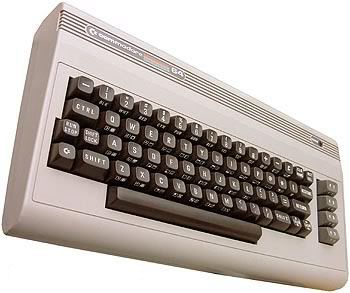 It's hard to believe it's been that long, but in August of 1982, a few months after starting production, the first Commodore 64 personal computers hit the shelves of retailers like Wal-Mart and Kmart. It wasn't long after that, this writer had one in his own bedroom, attached to a small black-and-white television. For many parents, a $600 investment (the initial price of the C64) was well worth it, in an era where video game consoles like the Atari 2600 were all the rage. It's hard to believe it's been that long, but in August of 1982, a few months after starting production, the first Commodore 64 personal computers hit the shelves of retailers like Wal-Mart and Kmart. It wasn't long after that, this writer had one in his own bedroom, attached to a small black-and-white television. For many parents, a $600 investment (the initial price of the C64) was well worth it, in an era where video game consoles like the Atari 2600 were all the rage.
Here's to the ultimate personal computer. It booted up in two seconds, and hardly ever crashed. If only they could pull off such magic again! |
| ~I.T. Mgr. | |
|
| 6/13/2012 7:58:03 AM | | | |
| Google Chrome won't submit a form in a JScript function? Here's a fix |
Back in September, we wrote a JScript function that avoided Internet Explorer's page-flipping download-crashing warning bar. During cross-browser testing, we discovered that Google Chrome doesn't seem to want to submit the form (although every other browser does it just fine). Here's the code:
fraGetFile.document.open();
freGetFile.document.write(short webpage w/ form);
fraGetFile.document.close();
document.all.divGetFile.style.visibility = 'visible';
fraGetFile.document.forms[0].submit();
setTimeout(''document.all.divGetFile.style.visibility='hidden'; '',15000);
After searching high and low for a solution, I thought about the possibility that the submit function was being executed before the form had actually been written to the iframe. I put the submit into a setTimeout, with a 5 second delay:
setTimeout('fraGetFile.document.forms[0].submit();',5000);
With a 5 second delay for form submission, then an additional 10 seconds for the iframe (inside the divGetFile DIV tag) to get hidden, the form creation and submission finally works in all the browsers we tested! |
| ~I.T. Mgr. | |
|
| 1/9/2012 7:42:05 AM | | | |
| How to get rid of the annoying Favorites button in IE8 classic view |
If you have someone that likes to use Internet Explorer in classic (non-tabbed) mode and make the most out of usable screen space, you've probably run into trouble trying to get rid of that lone Favorites button. Not the bar, just that annoying button that refuses to go away, no matter what bars and buttons you select to show or hide. Fortunately, there is a way to make that stupid button go away. Unfortunately, it also has the side-effect of disabling tabbed browsing, since where that button is acts as a placeholder for the tabs. Making it go away (and come back) is as easy as creating two new keys and a DWORD value in the registry. Here goes:
1) execute RegEdit
2) Navigate to HKEY_CURRENT_USER\SOFTWARE\POLICIES\MICROSOFT\INTERNET EXPLORER
3) Navigate to TOOLBARS, creating if necessary
4) Navigate to RESTRICTIONS, creating if necessary
5) Add a DWORD value "NoCommandBar" and set its value to 1
6) Exit the Registry and restart Internet Explorer.
That's it! |
| ~I.T. Mgr. | |
|
| 11/1/2011 7:59:17 AM | | | |
| Breaking the unbreakable mirror in Windows Server 2008 |
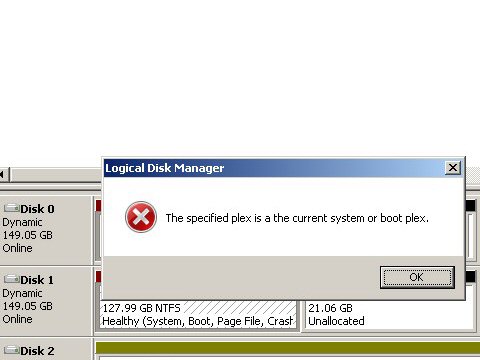 Some tasks are made tedious or difficult by "Are You Sure" messages, or even "You need to click this button if you really are in charge of this computer" messages. Others are just made impossible with red-ex enforced "You can't get there from here" messages. Such is the case when you try to break a mirror in Windows Server 2008. You open the Disk Management tool, select the mirror to break or remove, right-click, and try to break the mirror. The system replies with "The specified plex is a current system or boot plex." What to do? Some tasks are made tedious or difficult by "Are You Sure" messages, or even "You need to click this button if you really are in charge of this computer" messages. Others are just made impossible with red-ex enforced "You can't get there from here" messages. Such is the case when you try to break a mirror in Windows Server 2008. You open the Disk Management tool, select the mirror to break or remove, right-click, and try to break the mirror. The system replies with "The specified plex is a current system or boot plex." What to do?
The brutal way would be to open the box and pull the mirrored drive you don't want to boot to. There is a better solution, however.
1) boot to the drive you want to retain
1) open a command prompt with Admin authority
2) execute DiskPart
3) Use LIST VOLUME to see which volume you want to remove as a mirror
4) Use SELECT VOLUME to select the appropriate volume
5) Use LIST DISK, SELECT DISK, and DETAIL DISK to determine the ID of the disk currently booted to
6) Use BREAK DISK=id to break the mirror you are not currently booted to.
That's it! Now the mirror is broken, and you have two Simple Volumes. |
| ~I.T. Mgr. | |
|
| 9/2/2011 9:45:53 AM | | | |
| Avoiding the pesky download-crashing IE information bar |
If you've written JS scripts for downloading files, and have run into a dead-end with Microsoft's download-crashing information bar, this tip is for you.
A user clicks on a button to download a file. The file must be updated or prepared (in the case of our FileBox FileLoader, large files are automatically compressed prior to download), or perhaps display a message to the user about their download. In any case, a common way to do this is to have the click run some JScript which opens a new window to prep the file or show the message, and then a "setTimeout" event is used to request the file. Unfortunately, this operation is "asynchronous", and IE thinks you're trying to "push" a file to the user. To make matters worse, if the user clicks the bar and accepts the download, your webpage reloads, causing the user to lose his place, resubmit already submitted data, or some other malfunction.
The solution? Well, you could try instructing your users to disable a security feature in IE, but half of them won't do it, and the other half will blame you the next time they get a virus.
Instead, put a hidden iFrame in your page. When the user clicks, document.open, document.write, and document.close the contents of the iFrame with the form to submit. Set the iFrame visibility to visible, and frame.document.form.submit() to submit the form. Using hidden variables, and a visible message, you can inform the user of what's going on, while the form is being submitted to the server-side to request the file. The file Open/Save dialog will appear, and the user can then save their file. Finish off with a setTimeout to set the visibility of the iFrame to hidden, and that's it!
The button:
<A HREF='' onClick='jsfGetFile(filename);'><IMG SRC='downloadbtn.gif'></A>
The iFrame:
<DIV NAME='divGetFile' ID='divGetFile' STYLE='position:absolute; visibility:hidden; width:500px; height:140px;'>
<IFRAME NAME='fraGetFile' ID='fraGetFile' SRC='' >
</IFRAME>
</DIV>
The JScript (some variables and styles omitted for brevity):
<SCRIPT>
function jsfGetFbxFile(SubmitVal) {
// -- create form doc inside iframe -- //
fraGetFile.document.open();
fraGetFile.document.write('<HTML>');
fraGetFile.document.write('<BODY>');
fraGetFile.document.write('<FORM ACTION='dlpage.aspx METHOD='post'>');
fraGetFile.document.write("<INPUT TYPE='hidden' NAME='SubmitFor' VALUE='btnGetFile'>");
fraGetFile.document.write("<INPUT TYPE='hidden' NAME='SubmitVal' VALUE='" + SubmitVal + "'>");
fraGetFile.document.write('Preparing for download...<BR />');
fraGetFile.document.write('</FORM></BODY></HTML>');
fraGetFile.document.close();
document.all.divGetFile.style.visibility = 'visible';
fraGetFile.document.f1.submit();
setTimeout("document.all.divGetFile.style.visibility = 'hidden'; ", 30000);
}
Now you have a synchronous operation, and no download interruption! |
| ~I.T. Mgr. | |
|
| 7/29/2011 11:47:34 AM | | | |
| How to upgrade your Ultra 33046 UPS to give you longer run-time in a power outage |
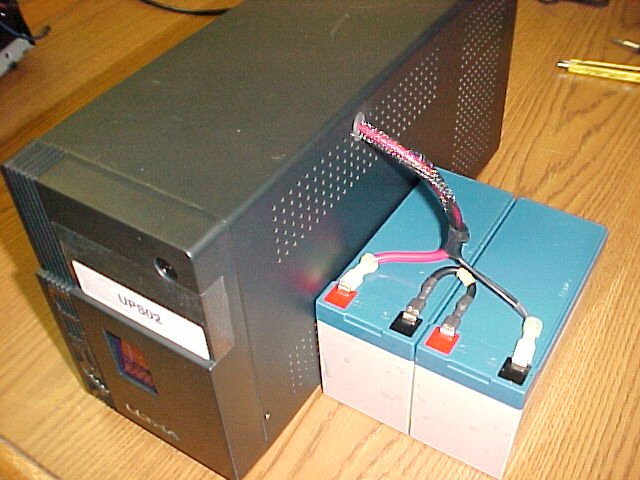 When the power goes out, one of two things happens. Everyone in the office groans because they refuse to save their work often and just lost an hour or more worth of work, or they just keep chugging away as if nothing were wrong, until their UPS battery peters out, and then commence with the groaning. When the power goes out, one of two things happens. Everyone in the office groans because they refuse to save their work often and just lost an hour or more worth of work, or they just keep chugging away as if nothing were wrong, until their UPS battery peters out, and then commence with the groaning.
I try to keep everyone (including myself) ready for a power outage. First, by making sure all workstations are protected with a UPS. Second, by reminding staff to save work often, and if there is a power outage, to quickly stop and save all work, and shut the system down gracefully.
Most desktop-size uninterruptable power supplies only last a few minutes, especially as the battery ages.
My favorite UPS is Ultra's 33046. It runs on 24v, two 12v SLA (sealed lead-acid) batteries mounted inside the case. As I took a few of them apart to replace their aging batteries, I noticed that there are extra battery terminals on the board (see here). I drilled a hole in the case side and inserted a grommet (click), made a battery cable set using scrap wire and 0.25'' quick-connects, and purchased additional batteries from McMaster-Carr.
The result is a UPS with nearly 3x the run-time, powering the same workstation as before. The extra batteries sit neatly to the side or atop the case. This gives even the most stubborn individual time to save their work and shut down their system before the UPS runs out of juice and gives up. |
| ~I.T. Mgr. | |
|
| 6/23/2011 11:28:15 AM | | | |
| How to get rid of a pesky duplicate record (row) in SQL |
I recently created a SQL database, with plans to import a tab-delimited file into it with a script that would also verify field contents. I wanted to make sure my data was going to transfer into the table properly from the script I had written, so the first time I ran it, I only let it loop through the first record. That worked, so I ran the script again against the whole file- forgetting to remove the first record I'd written to the table!
Logging in to SQL Server Management Studio to take a look, I noticed the duplicate record. "Oops," I thought, "I'll just right-click the row and delete it." ERROR: the row value(s) updated or deleted do not make the row unique or they alter multiple rows. What to do?
Create a unique field (column) and set it up as an IDENTITY. The process will establish a UID (unique ID) for each row. You can then delete the offending row, and then delete the temporary column.
create UID column
ALTER TABLE tablename
ADD TempID int IDENTITY(1,1)
click on duplicate row to delete it, and click DELETE
drop the UID column
ALTER TABLE tablename
DROP TempID
That's it! And, of course, be more careful about creating duplicate records in a SQL DB. |
| ~I.T. Mgr. | |
|
| 6/16/2011 7:58:49 AM | | | |
| Happy 100th Birthday to International Business Machines (IBM) !!! |
 Wow, can you believe it? A company founded as the Computing Tabulating Recording Corporation by merging together four smaller companies in 1911, then in 1924 taking on the name International Business Machines. This company is now ranked as the 18th largest firm in the US, according to Fortune Magazine (along with being the 7th most profitable). Not to rest on their laurels of being a time-clock and scale manufacturing company, IBM now holds more patents than any other US-based tech. company! If you think you don't have much to do with IBM, you might do well to remember that one of their many inventions was the Universal Product Code (aka barcode) in 1973, that you see on every item for sale at your local retailer. Currently, IBM has their tentacles in all kinds of technology projects, including solar power (CIGS thin-film PV modules) and DeveloperWorks, a useful IT community and development website. Wow, can you believe it? A company founded as the Computing Tabulating Recording Corporation by merging together four smaller companies in 1911, then in 1924 taking on the name International Business Machines. This company is now ranked as the 18th largest firm in the US, according to Fortune Magazine (along with being the 7th most profitable). Not to rest on their laurels of being a time-clock and scale manufacturing company, IBM now holds more patents than any other US-based tech. company! If you think you don't have much to do with IBM, you might do well to remember that one of their many inventions was the Universal Product Code (aka barcode) in 1973, that you see on every item for sale at your local retailer. Currently, IBM has their tentacles in all kinds of technology projects, including solar power (CIGS thin-film PV modules) and DeveloperWorks, a useful IT community and development website.
Happy 100th Birthday, IBM! |
| ~I.T. Mgr. | |
|
| 5/28/2011 8:07:15 AM | | | |
| FTP on IIS 7 generates new capabilities... and a 530 Valid Host Name Required error |
Yes, we've finally upgraded our FTP capabilities! We can now do FTPS (like HTTPS, it encrypts communications for security) and SFTP (Secure Shell file transfer, for even greater security, but with a speed compromise).
We un-installed IIS 6 FTP, and installed IIS 7.5 FTP, which is seamlessly integrated into the rest of IIS 7, making it easier to manage FTP and WWW sites in the same location and with the same interface. Upon attempting to log into the "new" FTP server, I immediately ran into the error:530 Valid Host Name Required trying to enter my user name. I knew the user name and host name was valid. I knew I had added the correct host binding that reflected the existing FQDN. And what's more, I fully tested the install on our backup server just a few days before!
The solution: You must have the [blank] host name bound! I did this without even thinking about it when I set it up on the backup for testing, but not when I set it up on the production server.
Additionally, if you have more than one FTP host on the same server, you need to transmit the user name as hostname|username. If you only have one FTP host, you can just leave the host name blank in the bindings, and all requests fall to that bound site.
|
| ~I.T. Mgr. | |
|
| 5/23/2011 11:47:31 AM | | | |
| We're on such a tight budget, we're removing hyphens from the word E-MAIL |
Jokes about the economy aside, this is widely seen as a good move, and I can't really disagree. The word e-mail has been around since about 1982, shortened from the pair of words electronic mail. Since the explosion of the World Wide Web, e-mail has become more commonplace in the lexicon of the average American. So much so, it has its own dictionary definition (which often already shows the hyphenless spelling). Now, the DMA's EEC (Email Experience Council) is in on the game, applauding the AP (Associated Press) decision to remove the cumbersome dash from their own use of the word. Says the EEC's Jeanniey Mullen, "...email marketing has grown from a marketing and consumer novelty to a critical lifestyle management and communication vehicle."
As we give our website a facelift here in the new future, we'll make sure to use the word email instead of that old-fashioned version. |
| ~I.T. Mgr. | |
|
| 5/5/2011 2:45:33 PM | | | |
| What time is it? Network share access issue from Win7 to Win2k |
One of our Windows 7 workstations we have set up for removable storage backup, was having trouble accessing a Windows 2000 data processing workstation. Login and password were correct and valid on both machines, yet the login failed, with "unknown username or bad password." NTLM settings? Nope. Network issue? Not that, either. Finally, I thought about looking at the system clock on both machines, remembering that I once had trouble downloading Windows Updates because of the time being set wrong on a PC. The time was within 1 minute on both machines, but, looking closer...
Turns out, the Win2k workstation was set to Pacific time zone (PDT), and the Win7 system was set to CDT. Changed the erronous time zone, corrected the clock, and now the user can back up his data. |
| ~I.T. Mgr. | |
|
| 4/28/2011 12:16:33 PM | | | |
| Creating a dynamic volume with DiskPart using a script |
So I'm in Windoes PE, running DiskPart.
On the command line, I can do this:
select disk 0
clean
convert dynamic
create volume simple
format fs=NTFS Label="Computer" quick compress
assign letter=C
but if I put the same commands in a script, I get a "file not found" error when trying to format (or assign, if I try swapping those two steps).
The script does work, though, when you set it up like this:
select disk 0
clean
create partition primary
format fs=NTFS Label="Computer" quick compress
convert dynamic
select volume 0
assign letter=C
I looked around quite a bit for an answer before coming up with my own solution, which is why it's being posted here. |
| ~I.T. Mgr. | |
|
|
|